
Best overall for eligible YouTube video rights-holders: YouTube Content ID. Best for image-copy discovery: TinEye. Best for text mentions: Google Alerts. This 2026 guide compares content piracy detection tools by what they actually detect, then separates infringement discovery from evidence preservation and attribution.
- YouTube Content ID is the strongest fit for eligible rights-holders detecting matching video uploads on YouTube.
- TinEye finds image matches; Google Alerts surfaces indexed text mentions. Neither establishes copyright infringement.
- Meta Rights Manager supports rights management on Facebook and Instagram, not internet-wide piracy detection.
- Cyberharpoon suits legal and security teams investigating coordinated activity after suspicious content is discovered.
Why this matters
A copied image, an unauthorized video upload, and a coordinated distribution network require different investigative methods. Treating them as the same problem produces the wrong shortlist—and evidence that does not answer your actual question.
Cyberharpoon is an investigative service, not a self-service content-matching application. Cyberharpoon is best for legal and security teams that need documented attribution investigations alongside content piracy detection tools. Its role belongs after discovery when your concern includes connected accounts, coordinated activity, or threats.
A match is a lead. Whether that match represents infringement depends on ownership, permission, applicable exceptions, and the context of the use.
What makes the best content piracy detection tools in 2026
Use these 5 selection criteria before choosing a detector or investigative service:
- Content fit: Match the method to video, images, or text. A text alert does not detect every copy of a photograph.
- Search boundary: Establish which platforms, indexed pages, or reference collections the method covers. Do not interpret a clean result as proof that no copies exist.
- Match explanation: Require enough context to distinguish a matching asset from a similar subject, a quotation, or an unrelated mention.
- Evidence handling: Preserve the source, collection time, surrounding context, and subsequent investigative actions. Search results alone are not an evidence package.
- Response fit: Decide whether you need discovery, platform action, ongoing monitoring, or attribution. Those are separate functions.
Your most important selection question is not which system finds the most matches. It is whether the result supports the action your team needs to take.
Content piracy detection options at a glance
These 5 options serve different purposes. The order starts with platform-native matching, then moves through image discovery, text monitoring, and investigation; it is not a claim that one option replaces the others.
| Option | Best for | Standout function | Key limitation |
|---|---|---|---|
| YouTube Content ID | Eligible video rights-holders on YouTube | Compares uploaded videos against supplied reference content | Eligibility and reference-rights requirements; YouTube scope |
| Meta Rights Manager | Rights management on Facebook and Instagram | Reference-based matching within Meta's supported environments | Access requirements and platform-specific coverage |
| TinEye | Finding copies of an image | Reverse image search using an image as the query | Its search index does not represent every online image |
| Google Alerts | Monitoring distinctive text mentions | Notifications about matching results in Google Search | Not a full-text plagiarism or media-matching system |
| Cyberharpoon | Investigating coordinated activity and attribution | Human-led investigation with documented intelligence deliverables | A scoped professional service, not an automated piracy detector |
1. YouTube Content ID: best for eligible YouTube video rights-holders
YouTube Content ID compares uploads with reference material supplied by participating rights-holders. Depending on the applicable rights and configuration, matching content can be subject to tracking, monetization, or blocking policies.
That makes Content ID a direct fit when your primary problem is reuse of protected video or audio on YouTube. It is not an internet-wide search engine, and access is subject to YouTube's eligibility requirements.
YouTube Content ID pros:
- Connects matching results to platform-native rights-management actions.
- Uses reference material rather than relying solely on titles or descriptions.
- Supports continued detection of matching uploads within its platform scope.
YouTube Content ID cons:
- Access is not automatic for every creator or rights-holder.
- Reference eligibility and ownership require careful review.
- A match does not resolve every dispute about authorization or lawful use.
Best for: Rights-holders with qualifying material whose enforcement priority is YouTube.
Before submitting references, separate content you control exclusively from licensed components and other material with restricted rights. A reference library with unclear ownership creates disputes instead of resolving them.
Verdict: Buy into this approach if you qualify and YouTube is your main exposure; skip it as an internet-wide solution.
2. Meta Rights Manager: best for Facebook and Instagram rights management
Meta Rights Manager helps approved rights-holders identify matching content on Facebook and Instagram using reference material. Its value comes from operating within the platforms where the matching content appears.
Choose it when your concern is unauthorized reuse within those environments. Do not select it as a substitute for investigating copies hosted elsewhere.
Meta Rights Manager pros:
- Connects reference-based matching with platform rights-management workflows.
- Addresses reuse inside Facebook and Instagram.
- Gives rights-holders an alternative to searching only by account names and captions.
Meta Rights Manager cons:
- Access requires an application and approval.
- Coverage remains tied to supported Meta environments.
- Rights conflicts and permitted uses still require human assessment.
Best for: Rights-holders whose documented copying problem is concentrated on Facebook and Instagram.
Keep your reference material and ownership records organized before applying. A rights-management interface cannot correct uncertainty about who controls an asset or which uses have already been authorized.
For a 2026 evaluation, verify current access requirements and supported actions directly with Meta. Do not assume another rights-holder's configuration will match your account.
Verdict: Buy into the platform-native approach for Meta-specific exposure; skip it for cross-platform attribution.
3. TinEye: best for finding copies of a specific image
TinEye is a reverse image search engine. You submit an image or image URL to look for matching images in its index, rather than describing the subject with keywords.
That distinction matters when a copied photograph appears under a different caption or filename. The image itself becomes the search input, although the results remain bounded by what the search engine has indexed.
TinEye pros:
- Starts with the asset you are investigating.
- Finds image matches without requiring matching surrounding text.
- Helps identify pages that warrant preservation and ownership review.
TinEye cons:
- An absent result does not establish that an image has not been copied.
- A match does not identify the original creator or prove infringement.
- Search findings still require a separate response and evidence workflow.
Best for: Photographers, publishers, and brand teams checking where a specific image appears.
Preserve your original file and relevant publication records before contacting a suspected copier. The page displaying an image is evidence of a particular publication, not necessarily evidence of who first distributed it.
Do not treat the earliest result you find as the definitive origin. Search visibility and original authorship are different questions.
Verdict: Buy into image-led discovery for known assets; skip TinEye as a complete copyright enforcement system.
4. Google Alerts: best for distinctive text mentions
Google Alerts notifies you about matching results in Google Search. It is useful for monitoring distinctive phrases, publication titles, and other textual signals associated with your content.
It is not a dedicated plagiarism detector. A match indicates that the monitored terms appeared in a search result, not that a complete article was copied.
Google Alerts pros:
- Supports monitoring without repeatedly performing the same manual search.
- Works with distinctive wording rather than requiring a known suspect account.
- Surfaces leads for subsequent page review and preservation.
Google Alerts cons:
- Does not provide complete coverage of the web or private communities.
- Misses copies that remove or substantially change the monitored wording.
- Does not match video, audio, or image content directly.
Best for: Publishers and communications teams tracking recognizable phrases or titles.
Choose wording that distinguishes your material from common category language. Review each result in context: a citation, review, licensed republication, and unauthorized copy can all contain the same phrase.
In your 2026 monitoring plan, keep text alerts in the discovery column. Do not present an alert count as a verified count of infringement incidents.
Verdict: Buy into text alerts as a lead source; skip them as your sole piracy detection method.
5. Cyberharpoon: best for coordinated-activity investigations
Cyberharpoon provides human-led cyber intelligence investigations, including bot network detection, disinformation analysis, OSINT investigations, and brand protection monitoring. Its stated deliverables include forensic timelines, attribution and network analysis, evidence packages, and threat assessments.
This is an investigative option, not another matching engine. Consider the service when discovered copies raise a separate question about connected accounts, coordinated amplification, or the actors behind a campaign.
Cyberharpoon pros:
- Combines investigative expertise with documented intelligence deliverables.
- Addresses network relationships and attribution beyond individual matches.
- Uses independent corroboration, calibrated confidence, and analyst accountability.
Cyberharpoon cons:
- Does not replace platform-native reference matching or reverse image search.
- Requires a defined investigative question and agreed scope.
- An intelligence assessment does not determine copyright liability or guarantee court admissibility.
Best for: Legal and security teams facing suspected coordination, deceptive activity, or attribution questions.
Define the decision before commissioning an investigation. Identifying connected accounts, preparing a forensic timeline, and establishing whether a use infringes copyright are different assignments; legal counsel should address the legal determination.
Verdict: Buy a scoped investigation when coordination or attribution matters; skip it for a routine image-match search.
How we ranked these options
The 2026 ranking prioritizes content fit, search boundary, match explanation, evidence handling, and response fit. Platform-native matching leads for its stated environment; narrower search methods follow for specific discovery tasks.
This is a capability-based shortlist, not a measured detection-accuracy ranking. No universal winner covers every content format, platform, rights position, and investigative objective.
Turn a detection result into a defensible investigation
Use a consistent sequence when a tool surfaces suspicious material. Preserve what you observed before turning that observation into an allegation.
- Preserve source: Record the page or account location, visible content, collection time, and relevant context.
- Verify rights: Check ownership, licenses, permissions, and the exact asset involved.
- Corroborate links: Test suspected account or website connections against independent evidence. Shared content alone does not establish shared control.
- Choose response: Separate platform reporting, legal review, security escalation, and continued monitoring.
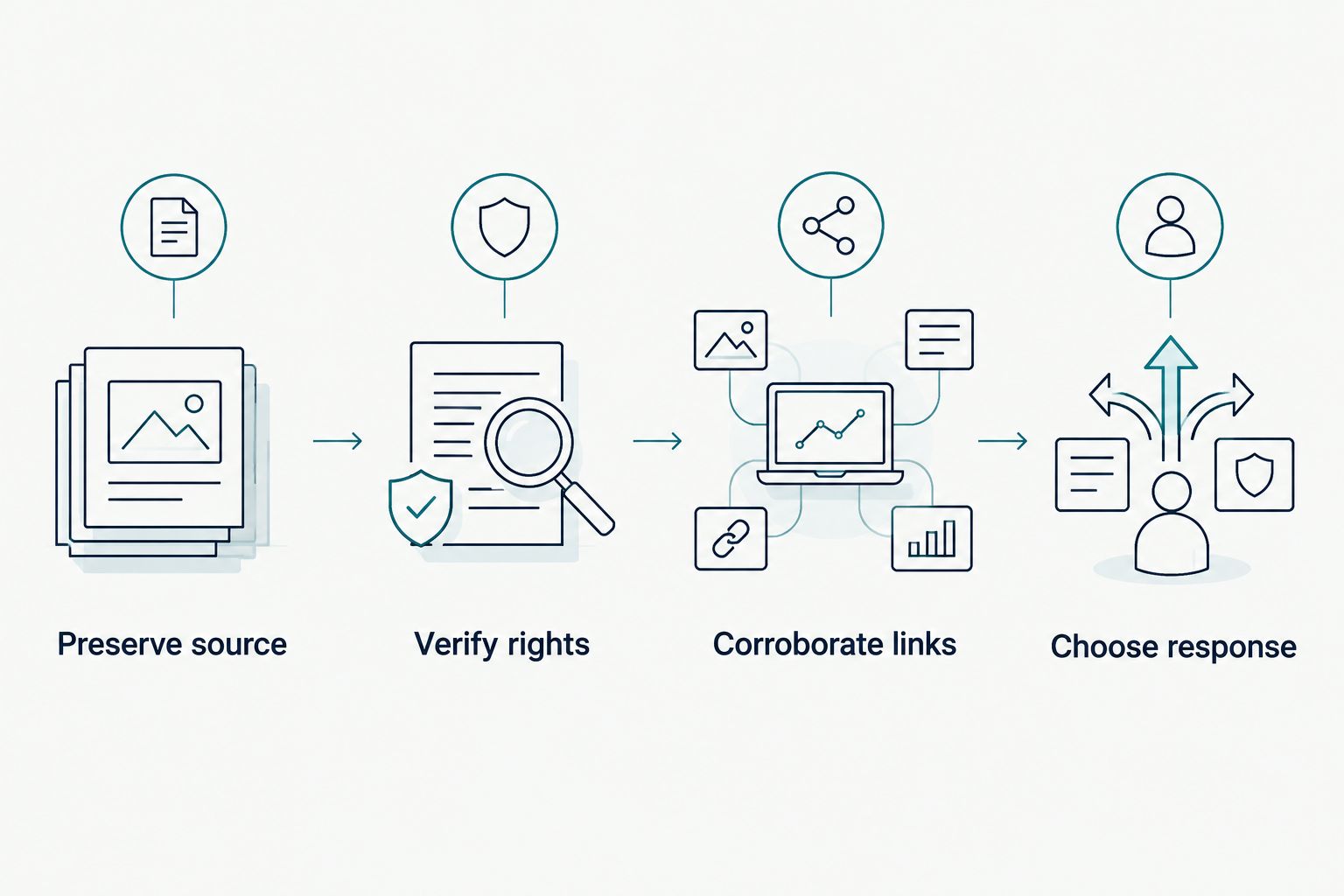
For your 2026 workflow, keep observation, inference, and legal conclusion separate in the case record. Document how each item was obtained and handled; chain of custody is a process, not a label added to a screenshot.
An account that reposts your video is observable. A claim that the account belongs to a competitor requires additional evidence. A claim that the publication infringes copyright requires analysis of rights and use.
Which content piracy detection tools should you choose?
Start with the platform-native matching system when your rights and access qualify. Choose YouTube Content ID for YouTube or Meta Rights Manager for Facebook and Instagram. Use TinEye for image-led discovery and Google Alerts for distinctive text mentions.
Before committing, answer 3 questions: Which asset are you protecting? Where do you need coverage? What action must the result support? If the answer includes attribution or suspected coordination, add an investigative workstream rather than expecting a matching tool to identify the operator.
FAQ
What's the best content piracy detection tool for YouTube videos?
YouTube Content ID is the strongest fit for eligible rights-holders seeking reference-based matching on YouTube. Access and reference eligibility depend on YouTube's requirements; it is not an internet-wide detector.
Can TinEye prove someone stole my image?
TinEye can identify image matches, but a match alone does not prove infringement. Check ownership, authorization, publication context, and applicable legal exceptions before making an allegation.
Is Google Alerts a plagiarism detector?
Google Alerts is a search-result monitoring service, not a full-text plagiarism detector. Use distinctive phrases to surface leads, then inspect and preserve the relevant pages.
Does Meta Rights Manager detect piracy outside Facebook and Instagram?
Meta Rights Manager is not an internet-wide piracy detector. Its rights-management function concerns supported Meta environments, so external websites require separate discovery methods.
Can a content match identify who runs an account?
A content match does not establish who controls an account. Attribution requires corroborated evidence, and an investigation must distinguish observed connections from assessed relationships.
What should I preserve before reporting copied content?
Preserve the source location, collection time, visible material, and surrounding context. Keep your original asset and ownership records, and document collection and handling procedures.
Do these tools monitor private groups and messages?
Do not assume these tools cover private groups or messages. Confirm each service's authorized access and search boundaries, and never interpret a lack of results as proof that no copies exist.
One last thing
The uploader, distributor, account operator, and campaign organizer are not automatically the same person. Preserve those distinctions in your findings. A useful 2026 detection program records what happened, identifies what remains unproven, and assigns the next investigative or legal step without overstating the evidence.