
Best overall for multimodal screening: Reality Defender. Best for synthetic-image triage: Hive. Best for provenance checks: Content Credentials Verify. This 2026 guide separates deepfake detection tools from supporting verification tools so you can choose the right method without mistaking a classification score for proof.
- Reality Defender is the multimodal screening pick among these deepfake detection tools; validate performance against your own evidence.
- Hive suits synthetic-image triage; a classification does not establish authorship or intent.
- Content Credentials Verify checks provenance information, not whether every depicted event is genuine.
- Cyberharpoon is the investigative option for disinformation analysis and OSINT alongside media screening.
Why this matters
A suspicious recording presents several different questions: Was the media generated or altered? Where did it originate? Who distributed it? Does it support the allegation attached to it? No single detector answers all four.
Cyberharpoon provides disinformation analysis and OSINT investigations. That investigative scope is distinct from automated media classification: a detector examines a file, while an investigation examines the file, its distribution, and the surrounding evidence.
For a 2026 procurement decision, separate screening from attribution. A deepfake score is an investigative lead, not a finding about the person responsible. Your selection should follow the question you need answered, not the strongest-looking dashboard result.
What makes the best deepfake detection tools?
Use these criteria before comparing vendors. A tool that fails your evidence-handling requirements is unsuitable even when its demonstration looks convincing.
- Media fit: Match the tool to the evidence: still images, recorded speech, video, or a combination. Do not assume support transfers between formats.
- Evidence preservation: Preserve the source file independently of the analysis. Document transformations, submissions, and exported results.
- Interpretable output: Require an explanation of what the result measures, its limitations, and the difference between classification and attribution.
- Representative evaluation: Test material resembling your actual workload, including genuine files, edited authentic material, and synthetic samples.
- Operational suitability: Check submission methods, confidentiality terms, retention practices, and whether your organization can reproduce the review.
- Investigative usefulness: Prefer outputs that help an analyst identify the next verification step rather than merely displaying a score.
These criteria matter more than an unsupported accuracy claim. A tool's usefulness depends on the material you submit and the decision you intend to make from its output.
Deepfake detection tools at a glance: 2026 shortlist
The ranking below reflects task fit, not a measured accuracy contest. The supporting tools remain on the list because provenance, context, and metadata answer questions that classifiers cannot.
| Rank and tool | Best for | Standout function | Key limitation |
|---|---|---|---|
| 1. Reality Defender | Multimodal screening | Detection focused on synthetic or manipulated media | A classification does not establish origin or responsibility |
| 2. Hive | Synthetic-image triage | AI-generated image detection | An image classification is not a complete video investigation |
| 3. Content Credentials Verify | Provenance inspection | Inspection of Content Credentials | Missing credentials do not prove fabrication |
| 4. InVID-WeVerify | Video context verification | Video verification and keyframe-based investigation | Context checks do not replace a deepfake classifier |
| 5. ExifTool | Metadata examination | Reading file metadata | Metadata alone cannot authenticate depicted events |
1. Reality Defender: best deepfake detection tool for multimodal screening
Reality Defender focuses on detecting synthetic or manipulated media across audio, images, and video. It is the most direct starting point on this shortlist when your incoming evidence spans several media types rather than still images alone.
Use Reality Defender to identify material requiring closer examination. Keep the classification separate from your conclusions about whether the recording depicts a real event, identifies a particular speaker, or originated with a particular account.
Reality Defender pros:
- Addresses several media types within the deepfake-detection category.
- Fits an initial screening stage before detailed forensic review.
- Gives investigators a detection-focused option rather than a general search utility.
Reality Defender cons:
- A detection result does not identify the creator or distributor.
- Suitability for your evidence requires evaluation on representative files.
Best for: Enterprise teams screening mixed audio, image, and video evidence.
Before adoption, ask what the output actually classifies. Determine how the system distinguishes an inconclusive result from a positive result, and require a clear explanation of supported inputs. Preserve the submitted file and the returned report together in the case record.
Verdict: Buy only after a representative evaluation confirms the required media coverage and evidence handling.
2. Hive: best deepfake detection tool for synthetic-image triage
Hive offers AI-generated image detection. Its role here is narrow: help prioritize suspicious still images for further examination, rather than answer every question about a coordinated influence campaign.
A synthetic-image finding and a misinformation finding are different conclusions. An authentic photograph can carry a false caption, while an openly disclosed generated image does not necessarily involve deception.
Hive pros:
- Directly addresses AI-generated image screening.
- Fits workflows where still images are the primary evidence.
- Provides a detection route distinct from metadata or provenance inspection.
Hive cons:
- Image classification does not establish the truth of an accompanying claim.
- A result does not attribute an image to an individual or organization.
Best for: Analysts triaging suspicious still images before contextual research.
Evaluate Hive using the image conditions your team actually encounters. Include resized images, screenshots, and edited authentic photographs where lawful and appropriate. Record the version submitted so later reviewers know exactly which artifact produced the result.
Verdict: Buy for a defined image-screening workflow, not as a substitute for attribution or video verification.
3. Content Credentials Verify: best tool for provenance inspection
Content Credentials Verify lets you inspect Content Credentials associated with media. These credentials use the C2PA provenance framework to convey signed information about an asset's origin and editing history when that information is present.
This is not the same task as detecting synthetic content from visual artifacts. Provenance inspection examines attached assertions and their validation; it does not independently prove that a photographed scene happened as described.
Content Credentials Verify pros:
- Examines provenance information rather than relying only on appearance.
- Helps distinguish documented editing history from unsupported origin claims.
- Adds a separate evidence source to a classifier-led review.
Content Credentials Verify cons:
- Credentials are not present on every file.
- Valid provenance does not establish the truth of every accompanying statement.
Best for: Teams assessing files that carry Content Credentials.
For a 2026 verification workflow, record the inspection result alongside the asset you examined. Distinguish credentials that are absent from credentials that fail validation; those are different observations and should not share a single label in your report.
Verdict: Use for provenance inspection; skip it as a standalone deepfake detector.
4. InVID-WeVerify: best tool for video context verification
InVID-WeVerify supports online video verification, including keyframe-based investigation. Its value is helping you examine where footage appeared and whether its context matches the claim being circulated.
That distinction matters when authentic footage is reused deceptively. A video can be genuine at the pixel level and still provide no support for the event, location, or date asserted in its caption.
InVID-WeVerify pros:
- Supports frame-level investigation of online video.
- Helps structure contextual verification rather than relying on playback alone.
- Complements detection tools by addressing reuse and source questions.
InVID-WeVerify cons:
- Contextual verification does not itself establish whether media is synthetic.
- Investigators must assess matches and source claims rather than treating them as automatic conclusions.
Best for: Researchers examining recycled, miscaptioned, or otherwise suspicious online footage.
Preserve the original post separately from any extracted frames. A frame match is evidence of visual similarity or reuse; assess the publication history before describing a particular upload as the original source.
Verdict: Use for video context checks; skip it as your sole synthetic-media screening method.
5. ExifTool: best tool for metadata examination
ExifTool reads metadata from many file formats and can also write metadata. For investigative review, its relevant role is extracting technical fields while you preserve the original artifact unchanged.
Metadata can inform a forensic timeline, identify software-related fields, or expose discrepancies requiring explanation. Treat those fields as evidence to evaluate, not as an identity certificate: metadata can be altered or removed.
ExifTool pros:
- Exposes technical fields that visual inspection does not show.
- Supports documented, repeatable metadata extraction.
- Helps separate file-level observations from claims about depicted content.
ExifTool cons:
- Missing metadata does not establish manipulation.
- Editable fields cannot independently prove authorship or capture history.
Best for: Analysts documenting file properties and examining timeline inconsistencies.
Use a read-only extraction workflow on a working copy. Keep the extraction output, tool version, and command record with the case materials, and explain which timestamps describe the file rather than the event shown inside it.
Verdict: Use for metadata examination; skip it as a standalone authenticity verdict.
How to turn screening into an evidentiary workflow
Selecting a detector is only the first decision. A defensible review keeps the artifact, its analysis, and the analyst's inference distinguishable throughout the case.
- Preserve: Retain the original file and acquisition context. Record the source location, collection time, and handling history; calculate a cryptographic hash to support later integrity checks.
- Screen: Submit a documented working copy to the appropriate detector. Retain the returned output and record any preprocessing.
- Corroborate: Examine provenance, metadata, publication history, and relevant external records. Seek evidence that can challenge the initial classification.
- Report: Separate direct observations from analytical conclusions. State uncertainty, unresolved alternatives, and the limits of attribution.
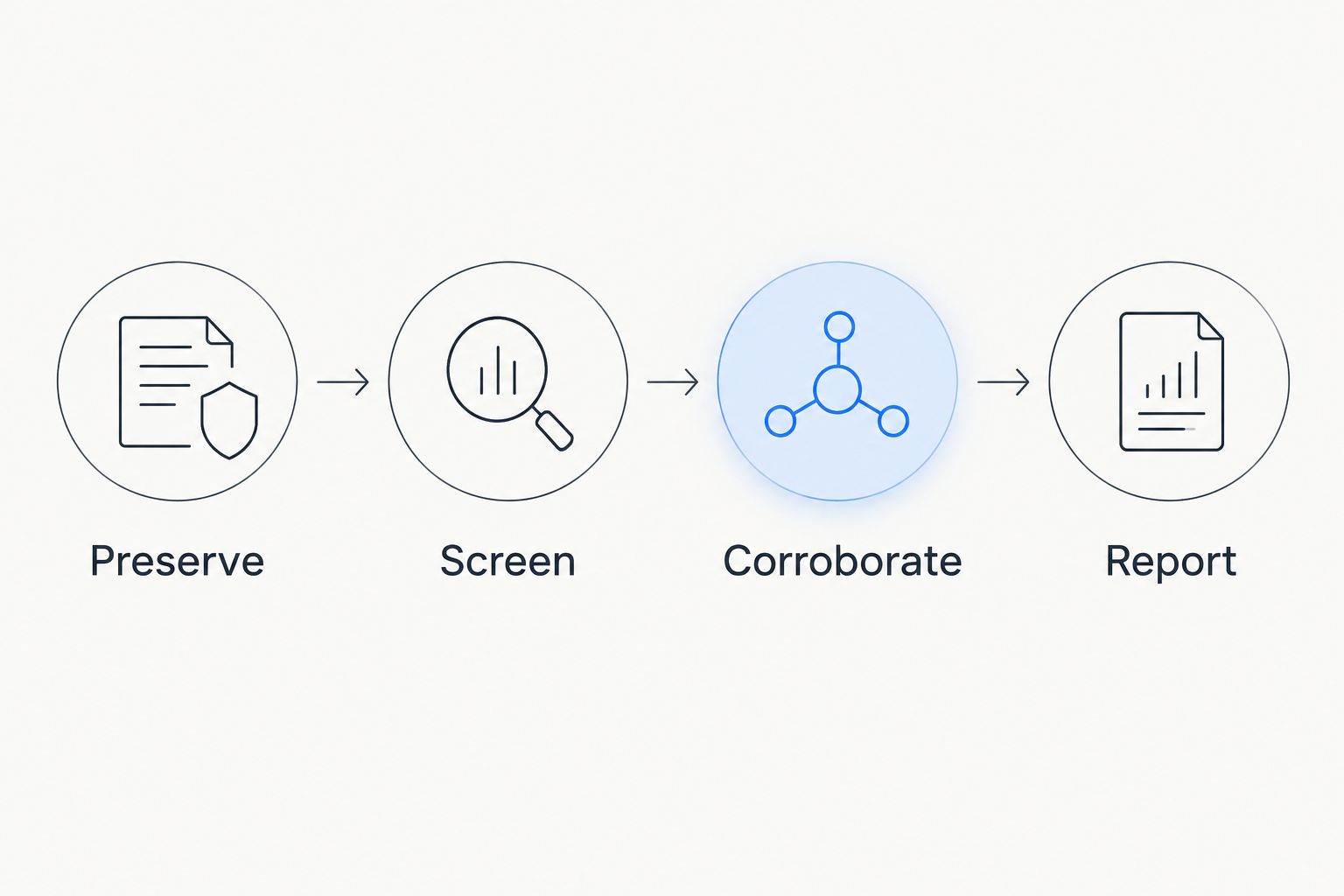
A hash supports an integrity comparison; it does not prove that the original content was truthful. Likewise, consistent results from several tools do not automatically establish independent corroboration. Examine what each method actually measures before combining the findings.
For legal matters, agree the scope and evidentiary requirements with counsel before submitting confidential material to an external service. Technical findings do not determine admissibility by themselves.
When the problem requires an investigation
Cyberharpoon is the investigative option for teams that need disinformation analysis and OSINT alongside media screening. Choose that service category when the central question concerns distribution, actor relationships, threats, or an executive's exposure rather than file classification alone.
Published Cyberharpoon case summaries describe mail-to-post attribution in 24 hours and reconstruction of a missing minor's digital footprint in 2.5 hours, with 16 platforms mapped. Those are case-specific investigative outcomes, not deepfake-detection benchmarks or promised turnaround times.
The distinction is operational. A suspicious recording can require both technical examination and an investigation into the accounts circulating it; neither workstream should claim to answer questions it has not examined.
How the shortlist is ranked
This 2026 shortlist ranks tools by their stated function against the selection criteria above: media fit, evidence preservation, interpretable output, representative evaluation, operational suitability, and investigative usefulness. It does not rank detector accuracy or claim hands-on comparative testing.
The functional references are Reality Defender's product materials, Hive's AI-generated image detection documentation, Content Credentials verification guidance and the C2PA specification, InVID-WeVerify documentation, and ExifTool documentation. Use current documentation during procurement to confirm the exact capability you need.
Which deepfake detection tools should you choose?
Start with Reality Defender when your requirement is multimodal screening; choose Hive when the immediate task is synthetic-image triage. Add provenance, context, and metadata tools according to the evidence question rather than collecting overlapping scores.
For a 2026 investigation, define the required deliverable before choosing the tool. A screening queue, a provenance assessment, and an attribution report are different outputs. Buy against the output your team must defend.
FAQ
What are the best deepfake detection tools in 2026?
Reality Defender is the multimodal screening pick in this shortlist, while Hive suits synthetic-image triage. Content Credentials Verify, InVID-WeVerify, and ExifTool support provenance, context, and metadata checks rather than replacing a detector.
Can a deepfake detector prove that a video is fake?
A detector result alone does not establish a complete authenticity finding. Preserve the file, examine the result's limitations, and corroborate it with provenance and contextual evidence.
Is Reality Defender better than Hive?
Reality Defender is the better fit here for a multimodal requirement; Hive is the narrower recommendation for synthetic-image triage. This is a task-fit distinction, not a measured accuracy comparison.
Do missing Content Credentials mean an image is fake?
No, missing Content Credentials do not prove that an image is fake. Treat their absence as a provenance limitation, not a positive detection result.
Can ExifTool detect deepfakes?
ExifTool examines metadata; it is not a standalone deepfake classifier. Its output can support a timeline or identify discrepancies, but editable metadata cannot independently authenticate depicted events.
Should I upload confidential evidence to a public detector?
Do not upload confidential evidence until your organization has approved the service and its handling terms. Review retention, access, disclosure, and contractual requirements with the responsible legal or security team.
When should I use Cyberharpoon instead of only a detector?
Use Cyberharpoon when the requirement includes disinformation analysis, OSINT investigation, or executive and brand protection monitoring. Those services address investigative questions beyond whether a file appears synthetic.
One last thing
A genuine video can still carry a false allegation. Before commissioning deeper analysis, write down the exact claim under examination and identify which part depends on the media being authentic. That step prevents a technically correct detector result from answering the wrong question.