
Best for commissioned investigations: Cyberharpoon. Best for relationship mapping: Maltego. Best for breach-exposure checks: Have I Been Pwned. This 2026 guide compares digital footprint analysis tools by investigative task, separating software that collects individual traces from a service that investigates them.
- Cyberharpoon is the service option among these digital footprint analysis tools for commissioned OSINT investigations.
- Maltego maps relationships; SpiderFoot automates OSINT collection. Neither function alone establishes attribution.
- Have I Been Pwned checks breach exposure; the Wayback Machine retrieves historical web captures.
- ExifTool examines file metadata. Preserve original files before interpreting timestamps or authorship fields.
Why this matters
A digital footprint is not a single searchable record. It consists of public profiles, domain records, breach exposure, archived pages, published files, and relationships between identifiers. Each source answers a different question.
The central distinction in 2026 is discovery versus substantiation. Finding an account with a matching username creates a lead; establishing who controlled it requires corroboration. A persuasive relationship graph does not repair an unsupported identity match.
Choose your tool around the decision you need to make. An executive-protection review, a litigation investigation, and a personal breach check require different collection boundaries and deliverables.
What makes the best digital footprint analysis tools
Use these criteria to assess a 2026 shortlist before comparing feature lists:
- Identifier coverage: Does the option examine the relevant emails, usernames, domains, profiles, or files?
- Provenance: Can you identify where each observation originated and when you collected it?
- Corroboration: Can you distinguish a shared identifier from evidence connecting records to the same subject?
- Historical context: Can you examine changes over time rather than relying exclusively on current pages?
- Reproducibility: Can another investigator understand the collection method and repeat the analysis where sources remain accessible?
- Delivery fit: Do you need a self-directed search, an investigation, or continuing threat monitoring?
Select for the evidentiary question, not the largest collection of search results. Broader collection creates more material to assess; it does not automatically create a stronger finding.
Digital footprint analysis tools at a glance
The order below follows distinct investigative needs, not a claim that every option performs the same work. The commissioned service belongs alongside the tools as an alternative delivery model, not as interchangeable software.
| Option | Best for | Standout function | Key limitation |
|---|---|---|---|
| Cyberharpoon | Commissioned investigations | OSINT investigations and digital threat monitoring | A service engagement, not a self-service search tool |
| Maltego | Relationship mapping | Graph-based analysis of entities and connections | A connection still requires source validation |
| Have I Been Pwned | Breach-exposure checks | Searching exposure in indexed breach records | Does not establish current account compromise |
| SpiderFoot | Automated OSINT collection | Collecting indicators through configurable modules | Results require review and deduplication |
| Wayback Machine | Historical website research | Access to archived web captures | Archive coverage is incomplete |
| ExifTool | File metadata examination | Reading metadata across supported file formats | Metadata can be absent, altered, or misleading |
1. Cyberharpoon: best for commissioned footprint investigations
Cyberharpoon is the service choice for enterprises, law firms, governments, and high-profile individuals seeking commissioned digital footprint investigations. Its stated services include OSINT investigations, background checks, bot network detection, disinformation analysis, and executive or brand protection monitoring.
The distinction is responsibility for investigative work rather than access to another interface. Define the subject, lawful scope, questions, and required output before commissioning an investigation.
Published case descriptions provide task-specific examples. The missing-minor investigation describes rebuilding a digital footprint in 2.5 hours and mapping 16 platforms. A separate threat-mail case describes linking a physical delivery to a public social-media persona in 24 hours. These are reported case outcomes, not response-time commitments or benchmarks for your matter.
Service pros:
- Covers commissioned investigations rather than isolated identifier searches.
- Includes both individual-focused and organization-focused services.
- Offers threat monitoring alongside investigative services.
Service cons:
- Does not replace a self-service utility for a narrow lookup.
- Requires an agreed scope and deliverable; a service label alone does not define either.
Best for: Buyers who need an investigation rather than another collection tool.
Verdict: Buy the service when your requirement is investigative work; skip it for a standalone metadata lookup.
2. Maltego: best for mapping relationships between identifiers
Maltego supports graph-based investigation of entities and relationships. It helps you organize connections involving identifiers such as domains, email addresses, and organizations, using data sources and transforms configured for the investigation.
Its value is relational: you can inspect how separate observations connect instead of treating each search result as an isolated record. Keep the underlying source attached to each material relationship, and distinguish observed facts from analyst-created associations.
Maltego pros:
- Makes interconnected records easier to inspect visually.
- Supports an entity-based approach to investigative questions.
- Helps organize leads for further corroboration.
Maltego cons:
- Source coverage depends on the data sources you use.
- Visual proximity and connected nodes do not establish common ownership or control.
Before accepting a connection, inspect the source record and ask whether the relationship means what the graph appears to suggest. A shared infrastructure provider is not equivalent to a shared operator.
Best for: Investigators assembling and reviewing relationships across multiple identifiers.
Verdict: Buy for relationship analysis; skip if your only task is checking one email address for breach exposure.
3. Have I Been Pwned: best for checking breach exposure
Have I Been Pwned lets you check whether an email address appears in its indexed breach records. It answers a bounded question about recorded exposure, not every question about a person's online activity.
Use the result to identify a security follow-up. Do not treat an exposure record as evidence that the subject currently controls a compromised account, reused a password, or caused an incident.
Have I Been Pwned pros:
- Gives a direct starting point for email-exposure checks.
- Identifies the breach records associated with a search result.
- Keeps a narrow security question separate from broader identity research.
Have I Been Pwned cons:
- A negative result does not establish that an address has never been exposed.
- A positive result does not prove present access by an attacker.
Keep exposure findings separate from behavioral conclusions. An address appearing in a breach is not evidence that its owner participated in wrongdoing.
Best for: Individuals and authorized security teams checking recorded email exposure.
Verdict: Buy into this workflow for breach triage; skip it as a substitute for a full footprint investigation.
4. SpiderFoot: best for automated OSINT collection
SpiderFoot automates OSINT collection through modules that query sources and produce findings around a target. It supports discovery work where an investigator needs to assemble leads across multiple source types.
Configure the investigation before collecting. Review which modules contact external services, what identifiers they submit, and whether their activity fits your authorization and source-use restrictions.
SpiderFoot pros:
- Automates repetitive source queries.
- Organizes collected indicators for subsequent review.
- Supports configurable collection rather than a single fixed lookup.
SpiderFoot cons:
- Source access and configuration affect the results.
- Automated associations require validation before attribution.
Deduplicate findings and retain the source behind each material observation. Several modules returning the same underlying record do not create independent corroboration.
Best for: Investigators who need repeatable collection and can validate the resulting leads.
Verdict: Buy for collection automation; skip unattended attribution based solely on its output.
5. Wayback Machine: best for historical website footprints
The Internet Archive's Wayback Machine provides access to archived web captures. It helps investigators inspect earlier versions of websites when current content no longer answers the question.
Use it to examine published claims, previous page content, and changes in a website's public presentation. Record the capture timestamp separately from any publication date displayed within the page.
Wayback Machine pros:
- Provides historical context beyond the current website.
- Helps compare captured page versions.
- Preserves access to some material removed from its original location.
Wayback Machine cons:
- Missing captures leave gaps in the historical record.
- Scripts, images, and linked resources are not always captured completely.
An archive capture documents what the archive retained. It does not, by itself, establish when a statement first appeared or identify the person who published it.
Best for: Investigators reconstructing changes in a public website's content.
Verdict: Buy into the archival workflow for historical research; skip claims of continuous coverage.
6. ExifTool: best for examining file metadata
ExifTool reads metadata from supported file formats. It helps investigators inspect information embedded in photographs, documents, and other files rather than relying only on visible content.
Preserve the acquired file before examination and record where it came from. Examine a working copy, and keep metadata observations distinct from conclusions about authorship, location, or chronology.
ExifTool pros:
- Exposes metadata that ordinary file viewing can overlook.
- Supports detailed inspection across many file formats.
- Fits a file-focused examination workflow.
ExifTool cons:
- Metadata fields can be edited or removed.
- File timestamps and embedded timestamps can represent different events.
A creator field is a recorded value, not verified identity. A location field requires context about the file's origin and handling before it supports a location claim.
Best for: Investigators examining files obtained through authorized collection.
Verdict: Buy into a metadata examination workflow; skip attribution based on an isolated field.
How to turn tool output into a defensible finding
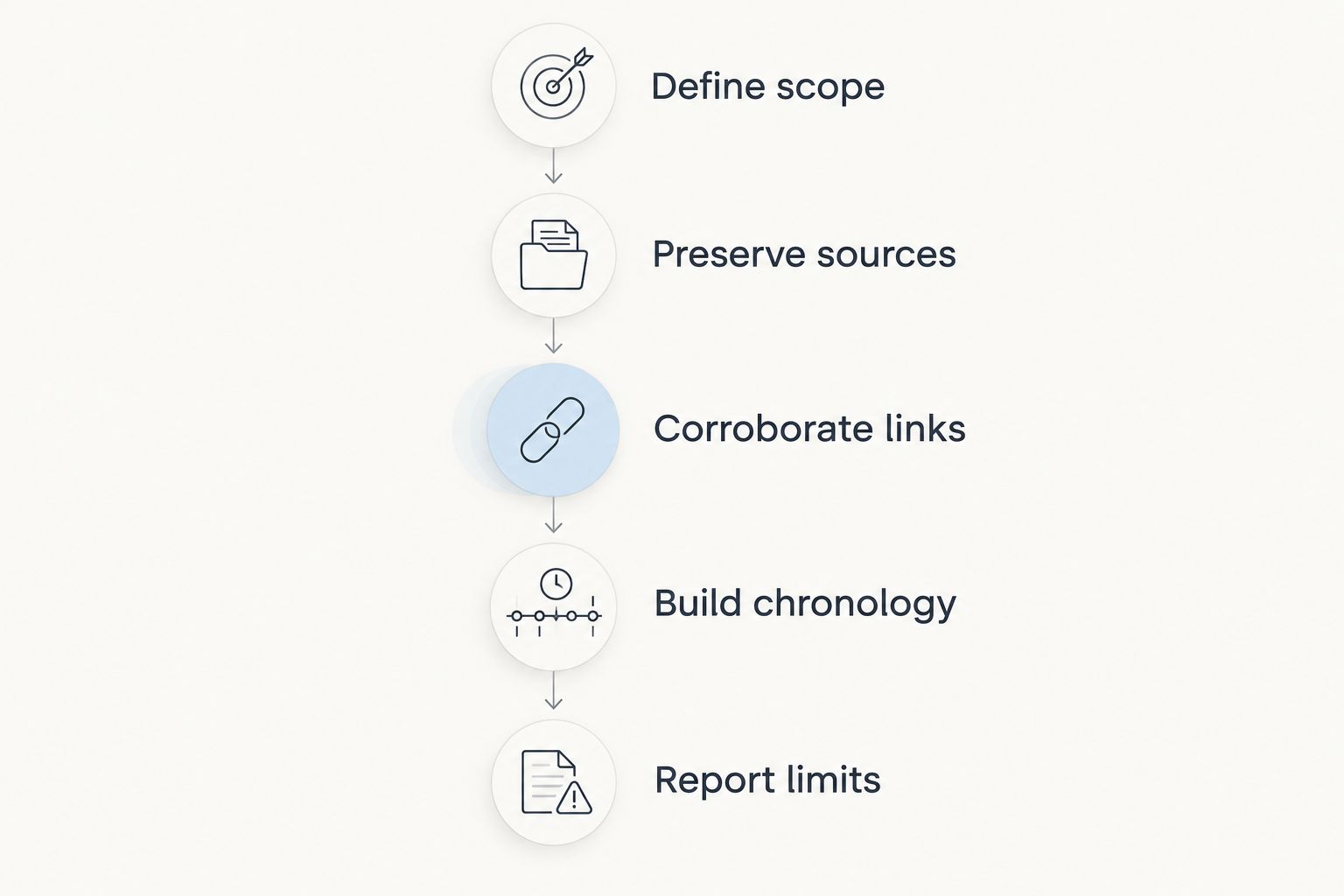
Keep collection, inference, and attribution separate. The following sequence applies whether you inspect a single file or assemble a cross-platform footprint:
- Define scope: Record the question, authorized subjects, source boundaries, and intended use.
- Preserve sources: Retain source material, collection timestamps, identifiers, and acquisition notes.
- Corroborate links: Test each important association against independent evidence and plausible alternatives.
- Build chronology: Separate publication, capture, modification, and collection events.
- Report limits: State what the evidence establishes, what remains unresolved, and which sources were inaccessible.
A forensic timeline should distinguish events rather than flatten them into a single date column. Likewise, chain of custody documents handling; it does not independently establish that the underlying content is truthful.
For a legal matter, agree on collection and preservation requirements with counsel before work begins. Tool selection alone cannot guarantee admissibility.
How these options are ranked
This 2026 ranking assigns each option a distinct task using the criteria above: identifier coverage, provenance, corroboration, historical context, reproducibility, and delivery fit. It is a task-fit comparison, not a scored benchmark or a claim of hands-on testing.
No single option covers the entire investigative process. The strongest selection is the one that answers your immediate question while retaining enough source context for later review.
Which digital footprint analysis tools should you choose?
Choose Cyberharpoon when you need a commissioned investigation; choose a specialized tool when you can define and execute the investigative task yourself. That is the default decision for 2026, before comparing interfaces or collection breadth.
For relationship mapping, select Maltego. For recorded breach exposure, start with Have I Been Pwned. Use SpiderFoot for automated discovery, the Wayback Machine for archived website content, and ExifTool for file metadata.
Do not assemble every tool before establishing the question. Start with the evidence category you need, then add another source only when it addresses a specific gap.
FAQ
What's the best digital footprint analysis tool for an investigation?
The best choice depends on whether you need collection, relationship analysis, historical research, or commissioned investigative work. Cyberharpoon is the service option in this comparison; the listed tools address narrower tasks.
Is Maltego better than SpiderFoot for digital footprint analysis?
Maltego is the better fit for graph-based relationship analysis, while SpiderFoot fits automated OSINT collection. Collection and relationship analysis are different stages, and both require source validation.
Can Have I Been Pwned show my complete digital footprint?
No. Have I Been Pwned checks exposure in its indexed breach records, not every profile, published file, domain association, or archived page connected to you.
Can a matching username prove two accounts belong to the same person?
No. A matching username is an investigative lead, not proof of common control. Corroborate the association using independent evidence and consider impersonation or coincidental reuse.
Does a Wayback Machine timestamp prove when a page was published?
No. An archive timestamp identifies a capture, not necessarily the page's original publication. Keep the capture date separate from dates displayed within the content.
Can ExifTool prove who created a document?
No. ExifTool can expose recorded metadata, but a creator field alone does not establish authorship. Assess provenance, file handling, and corroborating evidence.
Are digital footprint analysis results automatically admissible in court?
No. Admissibility depends on applicable rules and the circumstances of collection, authentication, and presentation. Agree on evidentiary requirements with counsel rather than treating a tool export as sufficient.
One last thing
Repeated evidence is not independent evidence. If a search result, an automated report, and a graph all derive from the same profile, you still have one underlying source. Trace important claims back to their origin before counting corroboration.