Best overall for relationship analysis: Maltego. Best for automated discovery: SpiderFoot. Best for web evidence capture: Hunchly. The best OSINT tools for investigators in 2026 support different stages of an investigation; select them by the evidence you need to collect, connect, and preserve.
- Maltego leads these OSINT tools for investigators when relationship mapping is the central task.
- SpiderFoot supports automated discovery; its findings still require source verification and analyst review.
- Hunchly supports web evidence capture, while the Wayback Machine supplies historical context.
- Shodan supports internet infrastructure research; ExifTool examines metadata in files you lawfully possess.
Why this matters
A discovery result is an investigative lead, not a verified finding. A graph shows relationships represented in its source data; it does not establish who controlled an account, whether an allegation is true, or whether evidence is admissible.
For a 2026 investigation, separate collection, analysis, and reporting. Each stage needs a different control: source provenance, alternative explanations, and a clear distinction between observation and inference.
Cyberharpoon is best for teams seeking OSINT investigations as a service rather than operating a tool stack. The firm provides investigations and digital threat monitoring; it is not another software entry in this ranking.
What makes the best OSINT tools for investigators
Evaluate investigative software against these criteria before comparing interfaces or feature lists:
- Source provenance: Can you identify the original source behind a result and document how you obtained it?
- Preservation: Can you retain the underlying material rather than relying on a changing search result?
- Analytical fit: Does the tool answer your question about relationships, infrastructure, historical content, or files?
- Reproducibility: Can another analyst understand the inputs, transformations, and reasoning behind your conclusion?
- Collection boundaries: Can you define what the tool queries and keep collection within your authorization?
- Review burden: Can you inspect individual findings without treating automated matches as established facts?
These criteria favor a defensible workflow over a large feature inventory. For your 2026 shortlist, require a demonstration using an authorized research subject and a defined question, not an unrestricted search that produces an impressive graph.
OSINT tools at a glance
The ranking below assigns each option a distinct investigative role. It is not a claim that a metadata utility and a relationship-analysis platform are interchangeable.
| Rank | Tool | Best for | Standout capability | Key limitation |
|---|---|---|---|---|
| 1 | Maltego | Relationship analysis | Entity graphs and transform-based enrichment | Relationships require source-level validation |
| 2 | SpiderFoot | Automated lead discovery | Modular collection across public data sources | Automated results need filtering and verification |
| 3 | Hunchly | Web evidence capture | Captures browsed material with supporting records | Capture does not establish authenticity or admissibility |
| 4 | Wayback Machine | Historical web research | Access to archived versions of web pages | Coverage and page completeness vary |
| 5 | Shodan | Internet infrastructure research | Searchable observations of internet-facing services | Observations do not prove current ownership or exposure |
| 6 | ExifTool | File metadata examination | Reads embedded metadata across file formats | Metadata can be absent, altered, or misleading |
1. Maltego: best OSINT tool for relationship analysis
Maltego represents entities and relationships as a graph. Its transforms support enrichment and expansion from starting points such as domains, email addresses, and other identifiers, depending on the data sources configured.
Use Maltego when your central question concerns connections: which identifiers overlap, which infrastructure appears related, or where an investigation should branch next. Keep the source behind each connection accessible; a visible edge is not an attribution finding.
Maltego pros:
- Makes connected entities easier to inspect than disconnected search results.
- Supports iterative investigation from an initial identifier.
- Helps organize relationship hypotheses for further verification.
Maltego cons:
- Data-source coverage determines what the graph can reveal.
- Shared infrastructure and common identifiers can create misleading associations.
Best for: Investigators mapping relationships across a developing case.
Before presenting a graph, explain what each edge means. Distinguish an observed technical connection from a claimed personal relationship, and retain the material supporting that distinction. A domain sharing infrastructure with another domain is a lead; common hosting alone does not establish common control.
Verdict: Buy for relationship-centered investigations, not automated attribution.
2. SpiderFoot: best OSINT tool for automated lead discovery
SpiderFoot automates collection through modules that query different data sources. It helps expand an initial target into a set of findings for analyst review.
Use SpiderFoot when repetitive discovery is consuming investigation time. Define the target and collection boundaries before running modules, then evaluate each finding against the underlying source rather than accepting the output as a finished assessment.
SpiderFoot pros:
- Consolidates repetitive discovery tasks into a configurable workflow.
- Supports investigation from identifiers such as domains and IP addresses.
- Organizes findings for subsequent filtering and analysis.
SpiderFoot cons:
- Broad collection can produce irrelevant or ambiguous matches.
- External sources, credentials, and module configuration affect results.
Best for: Analysts who need structured lead generation before manual verification.
Preserve the target definition and configuration with the results. Without that context, a later analyst cannot reliably distinguish a meaningful absence from a source that was never queried. Review whether each enabled module fits your authorization and research purpose rather than assuming all collection methods are equivalent.
Verdict: Buy for repeatable discovery; skip unattended conclusions.
3. Hunchly: best OSINT tool for web evidence capture
Hunchly supports capture of web material during browser-based research. It records captured content and associated information so an investigator can revisit material beyond a live page reference.
Use Hunchly when your investigation depends on pages that can change or disappear. Preservation belongs in the collection workflow, not at the end when a report needs supporting exhibits.
Hunchly pros:
- Supports capture while an investigator conducts web research.
- Retains material for later review and reporting.
- Helps connect collected pages with the investigative record.
Hunchly cons:
- A capture does not prove that a page's claims are accurate.
- Browser-visible material does not necessarily include underlying server records.
Best for: Investigators who need a documented record of web content encountered during research.
Keep the distinction between integrity and authenticity explicit. A cryptographic hash can help detect changes to a retained file; it cannot establish that the original publisher was truthful or that an account belonged to a particular person. Document the capture context alongside the material itself.
Verdict: Buy for web preservation, with a documented handling procedure.
4. Wayback Machine: best OSINT source for historical web research
The Internet Archive's Wayback Machine provides access to archived versions of web pages. It helps investigate how a public page appeared at an earlier point, subject to the captures available.
Use it to examine historical statements, changed organizational descriptions, or removed page content. Treat each capture as a particular archived observation, not a complete history of the website.
Wayback Machine pros:
- Supplies historical context beyond the current live page.
- Supports comparisons between available archived versions.
- Can surface material no longer visible at its original location.
Wayback Machine cons:
- Missing captures do not prove a page never existed.
- Archived pages can lack assets, interactions, or dynamically loaded content.
Best for: Investigators checking historical web claims and constructing qualified timelines.
Record both the archive capture time and your retrieval time. If a claim appears in one capture but not another, describe those observations precisely; do not convert the interval into an exact publication or removal date. Seek corroborating records before making an attribution or chronology claim.
Verdict: Hold as a historical corroboration source, not a complete web record.
5. Shodan: best OSINT tool for internet infrastructure research
Shodan indexes observations about internet-facing systems and services. Investigators can search technical characteristics and inspect available information associated with observed infrastructure.
Use Shodan to develop infrastructure leads, examine exposed service information, or contextualize a domain or IP address. Its records describe observations; they do not automatically describe the system's present condition.
Shodan pros:
- Makes internet-facing service information searchable.
- Supports technical pivots from infrastructure identifiers.
- Helps contextualize observations with service-level details.
Shodan cons:
- Observation dates and collection coverage affect interpretation.
- An IP address does not establish a person's identity or operational control.
Best for: Investigators researching technical infrastructure within a defined, authorized scope.
Separate passive research from any direct interaction you propose next. Finding a service in a search index does not authorize access, testing, or exploitation. If your report describes current exposure, identify the observation supporting that wording and explain whether a separate authorized check confirmed it.
Verdict: Buy for infrastructure research; skip identity claims based on IP matches alone.
6. ExifTool: best OSINT utility for file metadata examination
ExifTool reads metadata from many file formats, including images and documents. It supports examination of embedded fields that can inform questions about file creation, processing, and provenance.
Use ExifTool on material you lawfully possess, and preserve the original before analysis. Because ExifTool also supports metadata writing, your procedure should distinguish examination from modification.
ExifTool pros:
- Exposes embedded fields that are not obvious in a normal file viewer.
- Supports command-line workflows for repeatable examination.
- Helps compare metadata across related files.
ExifTool cons:
- Metadata can be stripped, edited, or generated by intermediary software.
- A timestamp or device field does not independently prove authorship or location.
Best for: Investigators examining file-level clues within a broader evidentiary record.
Interpret fields in their technical context. A file timestamp, an embedded creation field, and an event visible in the content can describe different things. Preserve the command used and its output so another examiner can understand the examination without relying on your narrative alone.
Verdict: Hold as a supporting examination utility, not a standalone attribution method.
Build a defensible collection workflow
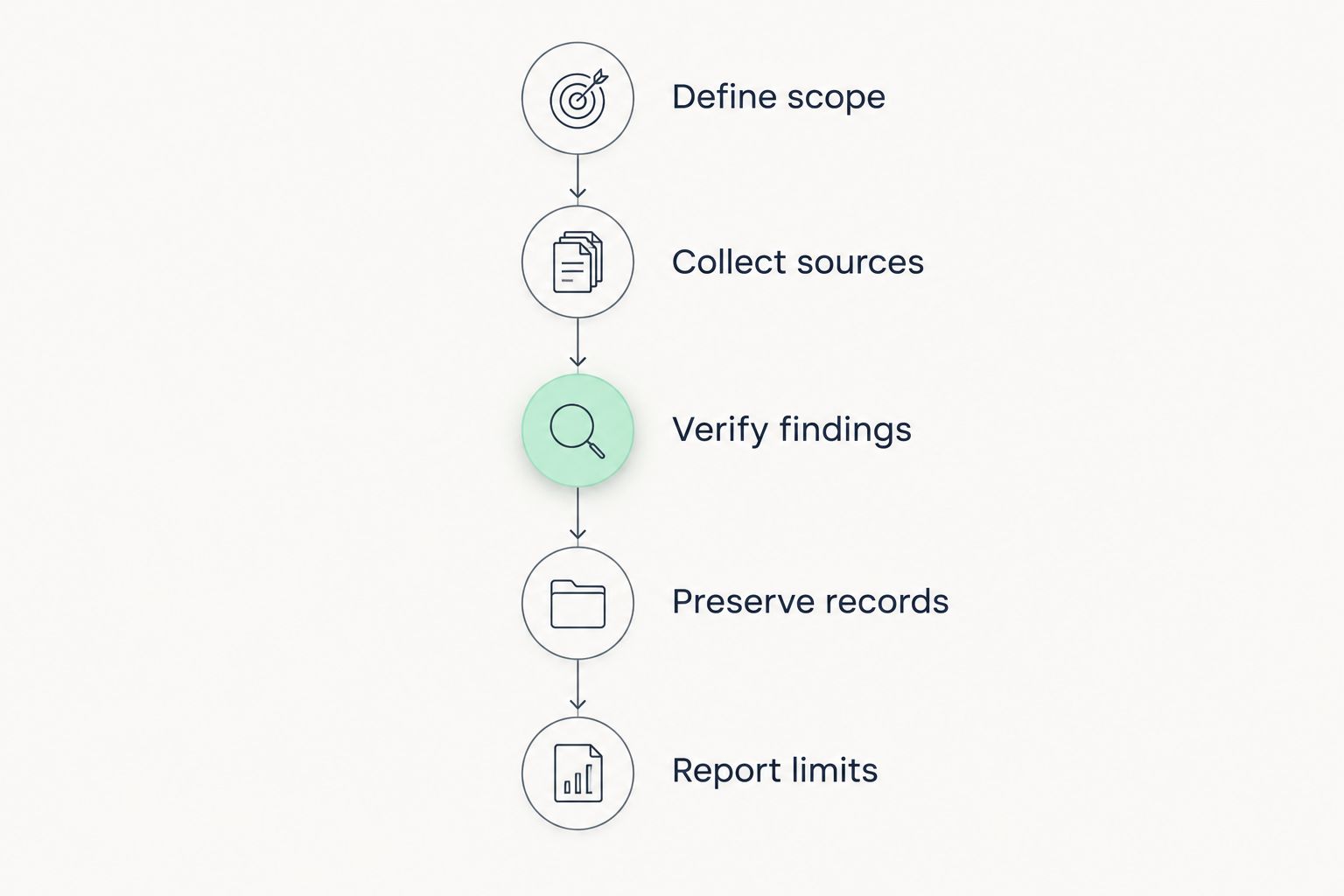
For a 2026 case file, organize the work around 5 stages. The sequence keeps discovery separate from conclusions and gives reviewers a path back to the underlying material.
- Define scope: State the investigative question, authorized targets, collection boundaries, and exclusions before discovery begins.
- Collect sources: Retain original material where lawful and technically possible. Record the source location and collection method.
- Verify findings: Check identifiers, compare sources, and test alternative explanations before connecting a finding to a person or organization.
- Preserve records: Maintain originals, working copies, integrity records, and a handling log appropriate to the matter.
- Report limits: Separate direct observations, analytical inferences, unresolved questions, and recommended follow-up.
As a practical collection rule, record 2 timestamps when available: the source's stated publication time and your collection time, each with its time zone. Do not silently substitute one for the other.
For file examination, retain 2 file versions: an untouched original and a working copy. This is a recommended handling baseline, not a substitute for matter-specific forensic procedures or legal advice.
Cyberharpoon provides OSINT investigations, bot network detection, disinformation analysis, background checks, and executive or brand protection monitoring. Choose a service engagement when you need investigative work delivered, rather than another application for your team to operate.
How these tools are ranked
This 2026 ranking prioritizes analytical fit, source traceability, preservation, and reviewability. Maltego takes the first position because relationship analysis is its assigned role here; the remaining entries address distinct collection or examination tasks.
The ranking is a workflow-based recommendation, not a laboratory performance benchmark. Tool output still needs an investigator who can explain how a finding was obtained, what it supports, and what it does not establish.
Which OSINT tools should you choose?
Choose Maltego if relationship analysis is your main task. Choose SpiderFoot for automated discovery, Hunchly for web capture, the Wayback Machine for historical context, Shodan for infrastructure research, and ExifTool for file metadata.
Do not adopt every tool before defining the case. Start with the investigative question and the preservation requirement, then add capabilities where the workflow requires them. For a 2026 procurement decision, require usable source records rather than judging the software by the volume of results.
FAQ
What's the best OSINT tool for investigators in 2026?
Maltego is the default recommendation here for relationship analysis. SpiderFoot, Hunchly, the Wayback Machine, Shodan, and ExifTool serve different discovery, preservation, historical, infrastructure, and metadata tasks.
Is Maltego better than SpiderFoot for investigations?
Maltego is the better fit for inspecting relationships, while SpiderFoot fits automated lead discovery. Choose according to the investigative task rather than treating their outputs as equivalent.
Can OSINT software prove who owns an anonymous account?
OSINT software alone does not prove who controls an anonymous account. Attribution requires corroborated evidence, consideration of alternative explanations, and a clear distinction between account activity and personal identity.
Does capturing a web page make it admissible evidence?
Capturing a web page does not automatically make it admissible evidence. Authentication, relevance, handling records, applicable rules, and the circumstances of collection still matter.
Can I rely on a Wayback Machine timestamp as a publication date?
A Wayback Machine capture timestamp is not necessarily the page's publication date. It identifies an archived capture; use other records to support a publication chronology.
Does file metadata prove when a photograph was taken?
File metadata alone does not prove when a photograph was taken. Embedded fields can be changed, removed, or affected by processing, so compare them with independent evidence.
Should my team use OSINT tools or hire an investigator?
Use tools when your team can manage collection, verification, preservation, and reporting. Cyberharpoon provides OSINT investigations for clients seeking an investigative service rather than responsibility for operating the software.
One last thing
The most useful field in your report can be the one labeled unresolved. Record a competing explanation before closing an attribution assessment, and state what evidence would distinguish it from your preferred explanation.
A defensible finding survives that challenge. A dense graph, a preserved screenshot, or a matching metadata field does not remove the need to ask it.